Keeping a CRM tidy usually means manually attaching emails to the right deal. CMass does the matching for you. When you open an email thread in Gmail with the CRM panel open, it checks who's on the thread against the contacts on your records — and if it finds a match, it offers to link them.
How the match works
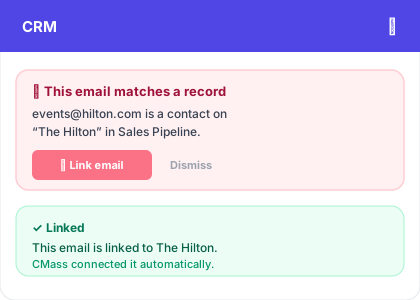
The match is deterministic: CMass compares the email addresses of everyone on the thread to the contact emails on your records. If events@hilton.com is on the thread and also a contact on your 'The Hilton' record, that's a match. There's no AI guessing and no reading of message content — just a clean comparison of participants.
Linking in one click
When there's a match, a suggestion card appears at the top of the CRM panel: 'This email matches a record.' Click the coral 'Link email' button and the thread is attached to that record's linked emails. If it's already linked, CMass shows a green confirmation instead so you don't double-link.
- 1Open an email thread in Gmail
- 2Open the CMass CRM panel
- 3If a contact on the thread is on one of your records, a suggestion appears
- 4Click 'Link email' to attach the thread to that record