Most replies in outreach campaigns come from follow-ups, not the first email. The average cold email gets a response rate of 2–4%. A well-timed 3-email sequence — initial + two follow-ups — can push that to 8–12%. CMass automates this entire process.
How sequences work
A follow-up sequence is a series of emails sent to recipients who meet a condition (no reply, no open, or always) after a set number of days. CMass tracks each recipient individually — the moment someone replies, they're removed from the sequence and no further follow-ups are sent to them.
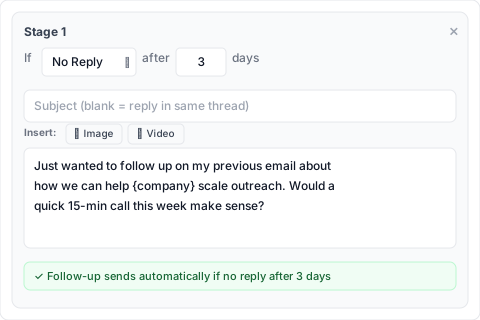
Creating a follow-up stage
- 1Open CMass and go to the Settings tab
- 2In the 'Auto Follow-up' section, click '+ Add Stage'
- 3Configure the condition, delay, subject, and body for this stage
- 4Repeat for each additional follow-up
Stage settings
Condition
- ▸No Reply — send the follow-up only if the recipient hasn't replied to the previous email (most common)
- ▸No Open — send only if the recipient hasn't opened the previous email (requires open tracking enabled)
- ▸Always — send regardless of what the recipient did (useful for post-purchase sequences or announcements)
Delay
The number of days to wait after the previous email before sending this stage. The clock starts from when the previous email was actually delivered, not from when you scheduled the campaign.
Subject
Leave the subject blank to reply in the same thread (recommended for follow-ups — it threads the conversation and increases reply rates). Enter a subject to start a new thread.
Body
Write the follow-up message. Merge tags work here too. Keep follow-ups short — 2–4 sentences is ideal.
Recommended sequence structure
Email 1 (Day 0) — Initial outreach
Your main pitch. Personalized, concise, with a clear ask. 150–200 words.
Email 2 (Day 3–4) — Value add
Reference the first email briefly, then add something new: a relevant case study, a stat, a specific question about their situation. Condition: No Reply.
Email 3 (Day 7–8) — The breakup
'I'll stop reaching out after this one — just wanted to make sure this didn't get buried.' This email consistently gets the highest reply rate of any email in the sequence because it signals scarcity. Condition: No Reply.
Viewing sequence status
You can check how many recipients are in each stage of an active sequence from the CMass popup in your Chrome toolbar — click the toolbar icon and select a campaign to see its sequence status.