Most outreach is a variation on something you've sent before. Instead of keeping a separate library of templates to maintain, CMass lets you reuse any campaign you've already sent as the starting point for a new one.
Select Past Email
Open the CMass panel and go to the Template tab. At the top is a Templates dropdown labeled 'Select Past Email'. Open it and you'll see your most recently sent campaigns by name.
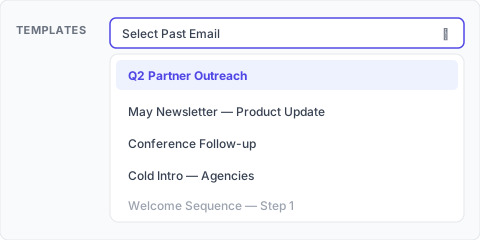
Pick one and CMass instantly fills the Subject and the email body with that campaign's content — including its merge tags and any images. From there you edit whatever you want and send it as a brand-new campaign. The original is untouched.
Good to know
- ▸The dropdown shows your most recent sent campaigns (drafts aren't listed) — up to the last 20.
- ▸Loading a template overwrites whatever is currently in the Subject and body fields, so pick your template before you start writing.
- ▸Merge tags like {first_name} come across intact and keep working with your new recipient list.
- ▸Because it copies the full body, any hosted images or follow-up-friendly formatting come along too.
✅ Build a starter: Want a reusable 'master template'? Send it once (even just to yourself as a small campaign) and it becomes available in the dropdown forever — your de-facto template library, with zero extra tooling.
💡 Reusing a past email only copies its subject and body. Recipients, schedule, follow-up stages, and tracking settings are set fresh for each new campaign.